How to build a fee from past projects and past fee estimates
How do I reuse past fee estimates to build a fee from past projects?
Short answer: Start from what similar contracts came in at, then build the new fee task by task from your own rate sheet. Corpus by SalemWise shows past contract amounts and public comparable fees with citations, fills rates and overhead from your rate sheet, and does the fee math in code; your team sets the hours and the principal approves the fee.
The problem, as a principal lives it
You are shortlisted. The client wants a fee proposal by next week. You did a similar water system plan for another city three years ago, and you remember it ran over. You do not remember by how much, what the hours were by task, or what rates you used.
So someone digs out the old fee spreadsheet, if they can find the right version. It has a different labor category list, last year's overhead rate and no notes on why the hours were set the way they were. The PM rebuilds the fee from scratch in a new spreadsheet, and the principal checks the formulas by hand the night before it goes out.
How firms handle it today, and why it is slow
Most fees are built in spreadsheets that one person understands. Past fees sit in old proposal folders, contract files and the accounting system, each in a different shape. Public fees from other firms sit in agency records nobody has time to read. The parts that matter for the next fee, what similar work actually paid and where the hours went, take the longest to find.
A spreadsheet also hides its mistakes. One wrong cell reference can carry through to the total, and a reviewer cannot see where each rate came from.
Your options
A firm fee template
A standard template with your labor categories, current rates and overhead makes every fee start from the same place. It does not tell you what similar work paid before.
ERP and accounting systems: Deltek Vantagepoint, Unanet
Your ERP holds your project records. Deltek's Vantagepoint help says the Proposals tab on the Projects form is for "a project's background or history information, including project codes, descriptions, awards received, and associated proposals" (Deltek help, checked October 10, 2026). That is the record of your own history. Whether past fees and hours by task sit there in a form you can compare depends on how your firm set it up, and pulling comparable jobs out of it still takes someone who knows the system. Our Deltek Dela review covers what its AI assistant reaches.
General assistants: Microsoft 365 Copilot, Glean
A general assistant can find an old spreadsheet and summarize it. It is not built to do fee math you can check line by line. See our Copilot guide.
Corpus by SalemWise
Corpus shows what similar work paid, with citations, and builds the new fee with the math done by code. Arithmetic done in code is only as good as its inputs and formulas, so a qualified person still checks them.
How Corpus does it, step by step
- Look back first. In the live demo, the research for the RFQ includes cost history from bid tabs and comparable public fees from other firms' public contracts, each cited to its page and marked as a comparable. The go/no-go scorecard turns that into a suggested fee benchmark score with its reason.
- See your own history. The History tab lists past awards with each client: year, pursuit, outcome and contract amount, each row cited. See History and versions.
- Pull unit prices. Ask in plain words, for example how a unit price changed between two years in a bid item price report. Each figure comes back with its page.
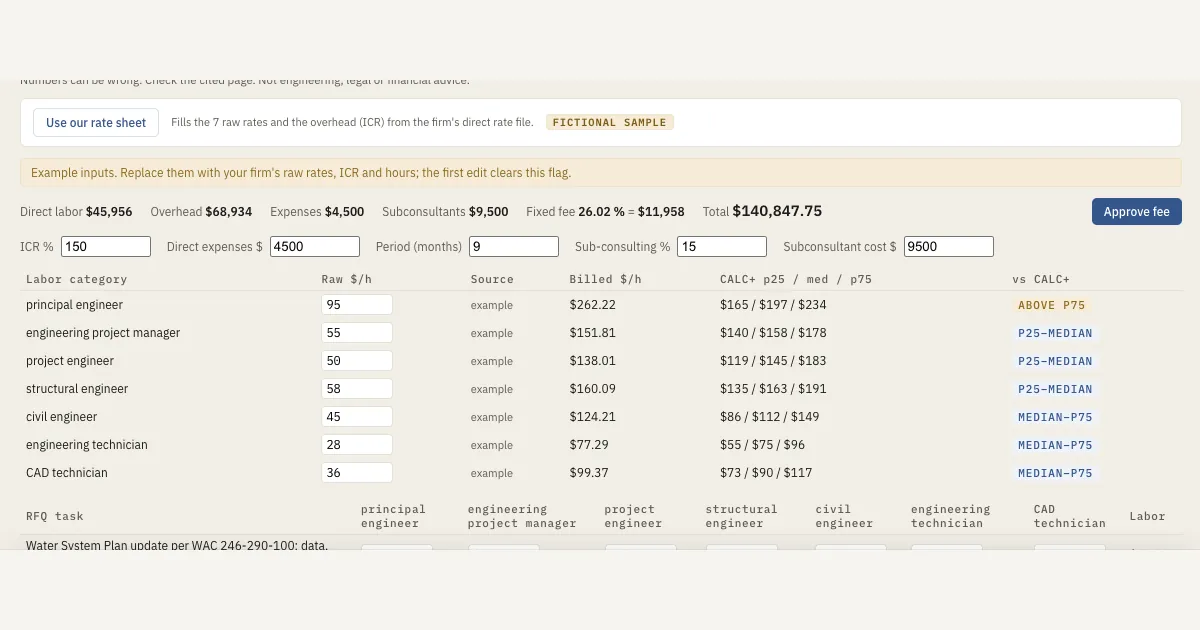
- Build the fee. The fee builder follows WSDOT's M 27-50 Appendix AA method. The RFQ's tasks are listed with the RFQ page they come from. Your team enters the hours by task and labor category.
- Fill rates from your rate sheet. Use our rate sheet fills the raw rates and the overhead (ICR) from the firm's rate file, each with its page. Each billed rate is compared with GSA CALC+ ceiling-rate benchmarks.
- Approve. Only the Principal role can approve a fee; Corpus records who approved (in the demo, the fictional Principal), the total and the time, and editing the fee clears the approval. Earlier versions can be compared and restored.
What a person still does
Your team sets the hours, checks the inputs and formulas, and the principal approves the fee. Corpus finds the history and does the arithmetic. It does not decide what the job is worth to you.
FAQ
How do I reuse past fee estimates?
Find what similar work paid, from your own contracts and public comparables, then build the new fee task by task from your current rates. Corpus by SalemWise shows both with citations and does the fee math in code.
Does Corpus estimate the hours?
No. Your team enters the hours by task. Corpus lists the RFQ's tasks with their pages, fills rates and overhead from your rate sheet, and does the math.
Can anyone at the firm see our rates?
No. In the demo the rate sheet and salary rates are restricted to roles such as the principal and project manager, and firm rates inside a saved version stay hidden from roles that cannot see the rate sheet.
Is the fee math done by the AI?
No. The fee math is done by code, line by line, not by the AI. Arithmetic done in code is only as good as its inputs and formulas, so a qualified person still checks them.
Next step
Start with a free 30-minute call. Bring a pursuit you need to price. If it fits, the next step is a $5,000 pilot on one real pursuit, with a go/no-go scorecard, an SOQ draft with page citations to check and a fee build, credited toward setup if you sign a deployment within 60 days of the pilot's end. Book a free 30-minute call, read how the pilot works, or see Corpus.