How to decide go/no-go on an RFQ faster
How do I decide go/no-go on an RFQ faster?
Short answer: Use a written scorecard and spend the meeting on judgement, not on digging. Corpus by SalemWise reads the RFQ, researches it against your past projects with page citations and suggests scores for 6 of 9 go/no-go criteria; strategic fit, client relationship and staff capacity stay your call.
The problem, as a principal lives it
Three RFQs arrive in the same week. Each one would take a team most of a week to answer well. You can chase one, maybe two.
The go/no-go meeting is on Thursday. Before it, someone has to read each RFQ, work out what the client really wants, find the past projects that qualify, check what similar contracts paid, and remember whether the last job for this client went well. Most of that is digging, not judgement. When the digging runs late, the meeting turns into a gut call, and the firm chases work it was never going to win.
How firms handle it today, and why it is slow
Many firms use a scorecard: criteria such as relevant experience, client relationship, staff capacity, fee and risk, each scored and weighted. A good scorecard makes the decision consistent. The slow part is filling it in. The facts behind each score sit in old reports, bid tabs, contracts and people's heads. Someone has to find them, and nobody can easily check where a score came from a month later.
Your options
A written scorecard and a standing meeting
This is the foundation, and it costs nothing. Write down the criteria, the weights and the threshold. Hold the meeting at the same time every week. It makes the call consistent. It does not make the research faster.
Proposal tools with go/no-go features
Some proposal tools now include go/no-go help. OpenAsset says its Shred AI supports "targeted go/no-go analysis" and lists "RFP Go/No-Go Analysis" in its product menu (OpenAsset, checked October 10, 2026). Tools like this work from the RFP and the content your marketing team keeps in the tool.
CRM and pipeline tools
A CRM tracks opportunities and clients, which feeds the relationship and capacity questions. It holds what your team enters about each pursuit. It does not read the engineering record behind the experience you claim.
General assistants: Microsoft 365 Copilot, Glean
A general assistant can summarize an RFQ quickly. Scoring it against your past projects, with sources you can check, is a different job. See our Copilot guide.
Corpus by SalemWise
Corpus reads the RFQ, researches it against your project archive with page citations, and suggests scores for the criteria the archive can speak to. People score the rest.
How Corpus does it, step by step
- Pick the RFQ. In the live demo, the Principal / BD lead path opens a real public RFQ for a fictional sample firm.
- Read the research. Corpus answers six questions from the archive, one card each: RFQ intake, similar projects, cost history, comparable public fees, delivery risk and standards in play. Each finding is cited to its page. A card with nothing citable is marked "Nothing on file".
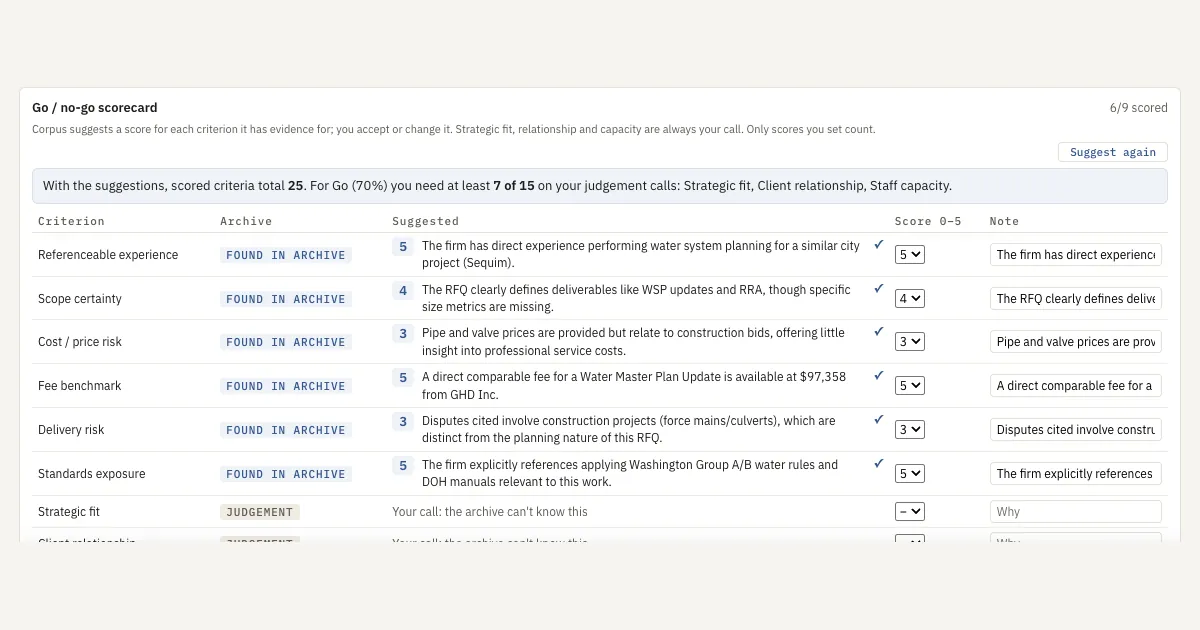
- Review the suggested scores. Corpus suggests a score from 0 to 5, with a reason, for 6 of the 9 criteria: referenceable experience, scope certainty, cost and price risk, fee benchmark, delivery risk and standards exposure.
- Score the judgement calls. Strategic fit, client relationship and staff capacity are marked "Your call: the archive can't know this".
- Accept or change. Only scores a person sets count. The scorecard shows what you need on the judgement calls to reach Go, then gives the verdict once all nine are scored.
- Look back at the record. See Bid results, competitors, win/loss for who won past pursuits and at what price, each row cited, and the lessons saved from each loss.
What a person still does
People own the decision. They score fit, relationship and capacity, check the cited pages behind the suggestions, and decide whether to chase the work. Corpus does the research before the meeting.
FAQ
How do I make go/no-go decisions faster?
Use a written scorecard, and get the research done before the meeting. Corpus by SalemWise researches the RFQ against your past projects with page citations and suggests scores for 6 of 9 criteria, so the meeting is spent on judgement.
Does Corpus make the go/no-go decision?
No. It suggests scores where the archive has evidence. Strategic fit, client relationship and staff capacity are always your call, and only scores a person sets count.
What does it need from us?
For the pilot, a copy of up to 3 years of your project PDFs and the RFQ you are pursuing now. Plan on about 4 hours of your team's time in total, plus the review call.
Can we use our own criteria and weights?
The demo uses nine criteria and a 70 percent threshold. Bring your own scorecard to the call and we will compare it with the demo's.
Next step
Start with a free 30-minute call. Bring the next RFQ you are deciding on. If it fits, the next step is a $5,000 pilot on that pursuit: a go/no-go scorecard with suggested scores linked to their sources, an SOQ draft with page citations to check and a fee build, credited toward setup if you sign a deployment within 60 days of the pilot's end. Book a free 30-minute call, read how the pilot works, or see Corpus.