How to find past projects and résumés for an SOQ without days of digging
We spend days digging through old project folders to find relevant past projects and résumés for every SOQ. Is there software for this?
Short answer: Yes. Proposal tools such as OpenAsset, Deltek Vantagepoint and Unanet reuse the project descriptions and résumés your marketing team has already written. Corpus by SalemWise reads the project files themselves, lists your similar projects for the RFQ and drafts the SOQ sections with page citations to check, while your team writes what the archive cannot know.
The problem, as a principal lives it
An RFQ for a water system plan update lands on Monday. The SOQ is due Friday. It asks for three to five similar projects from the last five years, a project team with résumés, and a page limit you cannot go over.
You know the firm has done this work. The proof is spread across a network drive, a SharePoint site, and boxes of plan sets that were scanned years ago. The folder names follow three different conventions, depending on who set them up. The person who ran the best example project left in 2021.
So a senior engineer and a marketing coordinator spend two or three days opening folders, reading old reports and asking around. That is billable time, spent on every pursuit, before anyone has decided whether the job is worth chasing.
How firms handle it today, and why it is slow
Most firms keep a set of project descriptions and résumés in Word files or in a proposal tool. Marketing tailors them for each SOQ. That works for the projects someone already wrote up. It breaks down in three places.
First, the write-ups lag the work. A project finished last year may have no description yet, so someone has to read the final report to write one.
Second, the details an RFQ asks for live in the project files, not the write-up. City size, service area, the standards that applied, the contract amount: someone has to go back to the documents to find them.
Third, nobody can check a sentence quickly. When a reviewer asks where a number came from, the answer is often "I think it was in the 2019 report", and the search starts again.
Your options
Folder conventions and a project list
A clean folder structure and a spreadsheet of past projects cost little and help everyone. They depend on discipline that rarely survives a busy year, and they still leave you reading documents to pull out the details.
Proposal and DAM tools: OpenAsset, Deltek Vantagepoint, Unanet
These tools store the content your marketing team curates and reuse it in proposals. OpenAsset says its Employee module lets you "Maintain detailed profiles with certifications, project history, and skill sets" and "Link employee profiles to specific projects" (OpenAsset, checked October 10, 2026). Deltek's Vantagepoint help describes a Proposals tab that stores a project's "background or history information, including project codes, descriptions, awards received, and associated proposals" (Deltek help, checked October 10, 2026). Unanet says ProposalAI drafts from "approved source material such as past proposals, project sheets, resumes, firm overviews, project descriptions" (Unanet, checked October 10, 2026).
They are strong at reusing approved content. They work from what has already been written up, so the gap above remains: the project files themselves.
General enterprise search: Glean, Microsoft 365 Copilot
Glean says it has "275+ app connectors for personalized and permissions-enforced enterprise search" (Glean, checked October 10, 2026). Microsoft says Microsoft 365 Copilot grounds answers in organizational data such as "emails, files, meetings, calendars, teams" through Microsoft Graph (Microsoft Learn, checked October 10, 2026). Both are broad assistants for the whole company. Neither is built around an RFQ, an SOQ checklist or engineering project records. Our Copilot guide and Glean guide go deeper.
Corpus by SalemWise
Corpus reads the project files themselves: reports, specs, bid tabs, plan sets and RFQs. It drafts SOQ sections from them, with page citations to check. Here it works on the pursuit: the RFQ, the SOQ checklist and the fee. You can keep your proposal tool and carry Corpus's cited facts into it.
How Corpus does it, step by step
- Pick the RFQ. In the live demo, choose the Principal / BD lead path. The demo firm, Cedar Run, is fictional. Its archive is real public engineering documents.
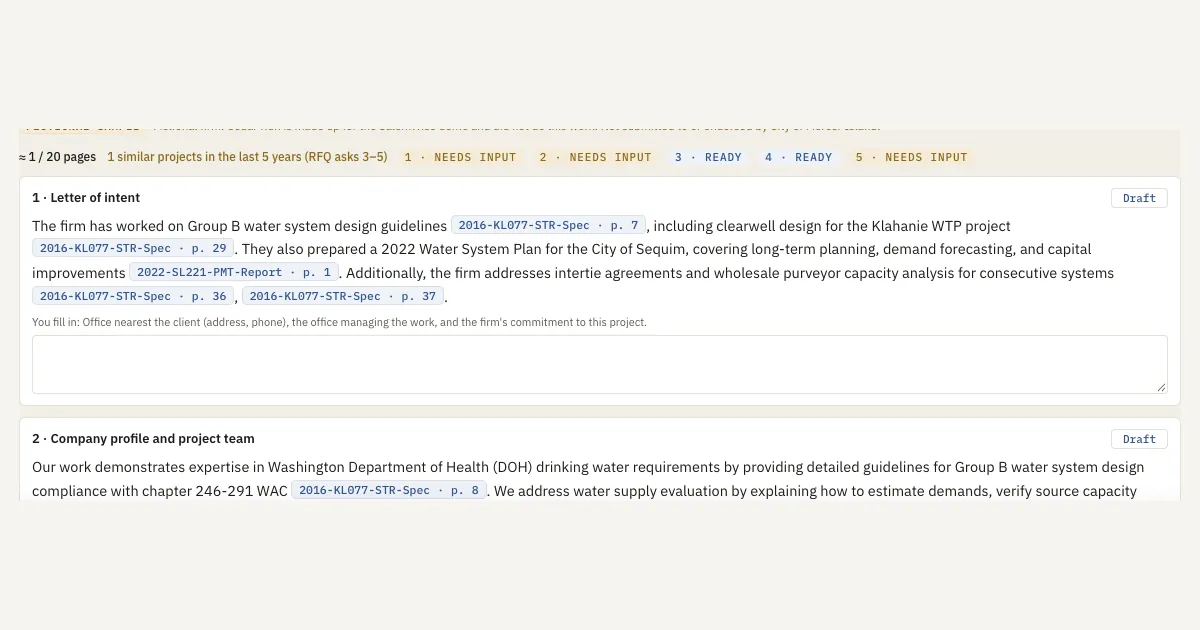
- Open the SOQ builder. It lists the RFQ's SOQ items: letter of intent, company profile and team, experience with similar projects, approach and schedule, and references.
- Check the count. The builder shows how many similar projects fall in the last five years against what the RFQ asks for, with each project's year. A project older than five years is marked as older.
- Draft. Each section is drafted from past projects in the archive. Each sentence is written to carry a page citation; open each citation, because the software does not check that every sentence is supported.
- Fill the gaps. Items the archive cannot support, such as references and the office nearest the client, are marked for a person to write.
- Pick the team. A suggested team comes from the staff roster and résumés, with the page behind each reason. A person accepts or edits each pick. See Staff records and a suggested team.
- Check the page. Click a citation and the source page opens with the sentence highlighted.
What a person still does
Your team reads the draft, edits it and signs it off. People choose the references, confirm the team and decide what to say about the firm's commitment. Corpus does the digging. It does not decide what goes out the door.
FAQ
Is there software that finds past projects for an SOQ?
Yes. Proposal tools reuse descriptions your team has written. Corpus by SalemWise reads the project files themselves, counts your similar projects against the RFQ and drafts SOQ sections with page citations to check.
Does it replace OpenAsset, Deltek or Unanet?
No. Keep the tool you use. Corpus gives your proposal team cited facts and a first SOQ draft from the engineering record, which you can carry into that tool.
Our files are on a network drive, not SharePoint. Does that matter?
No. The pilot uses a copy of a slice of your project PDFs and needs no connection. Set up for you: in full deployment we connect the network drive, SharePoint or ProjectWise during setup. No connector is ready-made; each is built for your archive during setup.
Where do our files go?
Set up for you: Corpus is cloud-agnostic. It runs on AWS, Azure, Google Cloud, or your own servers. It uses an open-weight model and no public AI API. In the pilot, your files are never used to train or fine-tune a model. In full deployment, fine-tuning on your files happens only if you agree in writing. We don't have a SOC 2 report.
Next step
Start with a free 30-minute call. Bring one RFQ you are chasing and tell us where your archive lives. If it fits, the next step is a $5,000 pilot on one real pursuit: about 2 to 3 weeks on a copy of up to 3 years of your project PDFs, credited toward setup if you sign a deployment within 60 days of the pilot's end. Book a free 30-minute call, read how the pilot works, or see Corpus.