How to find who worked on which past project for SOQ key staff
How do I find who worked on which past project for the key staff in an SOQ?
Short answer: Keep résumés and the staff roster where software can read them, then match them to the RFQ. In Corpus by SalemWise the SOQ builder suggests key staff from the roster and résumés, cites the page behind each reason, and a person accepts or edits every pick.
The problem, as a principal lives it
The RFQ asks for a project manager with three similar projects in the last five years, a hydraulic modeler, and a principal in charge. It also asks for their availability. Your SOQ is due in four days.
You know roughly who should be on the team. What you do not have in one place is proof: which projects each person actually worked on, in what role, and whether they have time next quarter. The résumés in the proposal folder were last updated two years ago. One of them still lists a project as "in design" that finished in 2024.
So the BD lead walks the halls, sends emails and reads old project reports to find names on title blocks. The team gets picked on memory, and the résumés get patched the night before.
How firms handle it today, and why it is slow
Résumés usually live in Word files or a proposal tool. Project history lives in the accounting or project system, in staffing spreadsheets, and on the documents themselves. Availability lives in a resource plan, if there is one. Nobody owns keeping all three in step, so every SOQ starts with reconciling them by hand.
Your options
Keep résumés current by hand
A quarterly résumé update helps, and it costs only time. In a busy year it slips, and the update is only as good as each person's memory of their own projects.
ERP, CRM and proposal tools: Deltek Vantagepoint, OpenAsset, Unanet
These tools hold staff records and résumés that your team maintains. Deltek's Vantagepoint help describes an Experience tab "to add, view, and edit project experience for an employee", including the projects an employee "is currently working on or has worked on", and a résumé grid "to enter, edit, or review text for employee resumes" (Deltek help, résumé grid, checked October 10, 2026). OpenAsset says its Employee module lets you "Link employee profiles to specific projects" (OpenAsset, checked October 10, 2026). Unanet says ProposalAI can "surface relevant project experience, personnel information" from approved content (Unanet, checked October 10, 2026).
These are the right home for staff records. They show what someone entered. They do not, on their own, match people to a new RFQ with the source behind each reason.
General assistants: Microsoft 365 Copilot, Glean
A general assistant can find a résumé file if it can see it. Matching a team to an RFQ and showing where each claim came from is a different job. See our Copilot guide.
Corpus by SalemWise
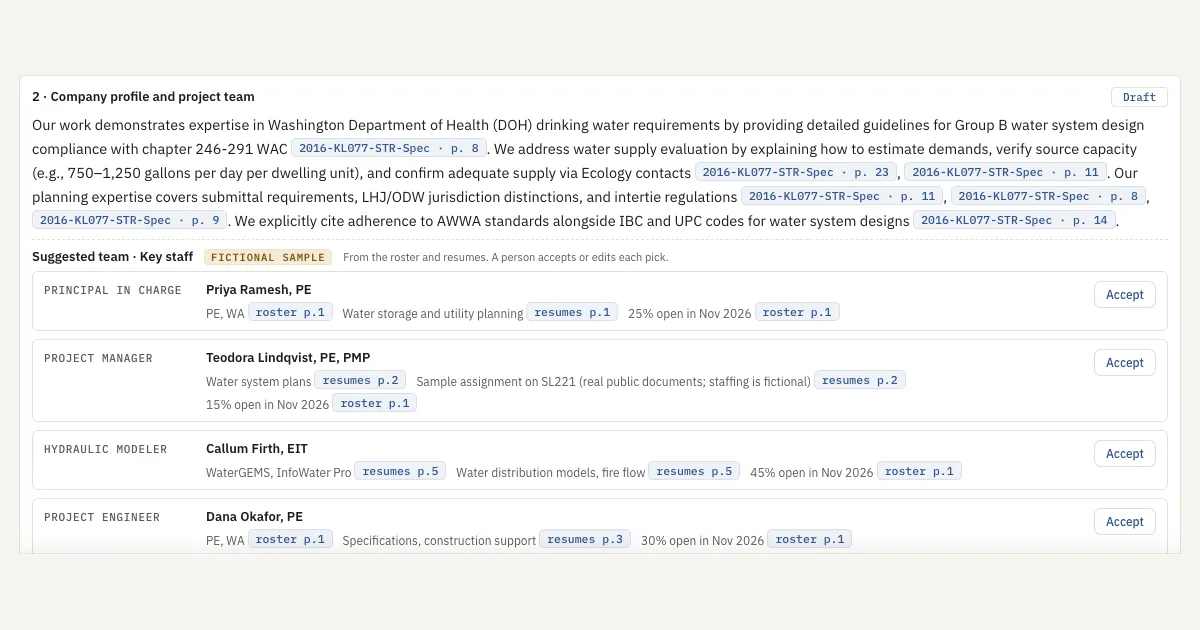
Corpus suggests key staff for an SOQ from your roster and résumés, gives its reasons with citations, and a person accepts or edits each pick.
How Corpus does it, step by step
- Open the SOQ builder. In the live demo, take the Principal / BD lead path to step 2, Draft the SOQ. The firm and its people are fictional samples.
- Read the suggested team. Under Company profile and project team, Corpus suggests a principal in charge, a project manager, a hydraulic modeler and a project engineer for this RFQ.
- Check each reason. Each pick shows its licence, the relevant experience and the person's open time, each cited to a page of the roster or résumés.
- Accept or skip. Accepting fills the Key staff field. Nothing saves until a person clicks Save Key staff.
- Look up the record. The Staff and HR records panel shows the roster: role, licence, billing category, office and years. See Staff records and a suggested team.
- Respect who sees what. The team and résumés need the principal, project manager or business development role. The HR file, with pay, utilization and certifications, is for the principal and HR only. See Roles: who sees what.
What a person still does
A person picks the team. Corpus suggests and cites; the principal or BD lead accepts or edits each pick, confirms availability with the people themselves, and writes the contacts and sub-consultants.
FAQ
How do I find who worked on which past project?
Look in three places: résumés, your project or accounting system, and the project documents. Corpus by SalemWise reads the roster and résumés and suggests key staff for an SOQ, with the page behind each reason.
Does Corpus pick the team for us?
No. It suggests a team with reasons. A person accepts or edits each pick, and nothing saves until a person clicks Save Key staff.
Can everyone at the firm see résumés and HR records?
No. In the demo the team and résumés need the principal, project manager or business development role, and the HR file is for the principal and HR only. Set up for you: tying roles to named people is part of full-deployment setup.
Our résumés are out of date. Does this still help?
It helps you see what the résumés and roster say, with the page behind each claim, so you can spot what to update. It cannot know work that is not written down anywhere.
Next step
Start with a free 30-minute call. Bring an RFQ and the roles it asks for. If it fits, the next step is a $5,000 pilot on one real pursuit, about 2 to 3 weeks, credited toward setup if you sign a deployment within 60 days of the pilot's end. Book a free 30-minute call, read how the pilot works, or see Corpus.