How to get answers from your project archive with page citations
Is there AI document search for civil engineering firms that searches our project archive and cites the page?
Short answer: Yes. Look for a tool that answers from your own project files, cites the document and page behind each claim, opens that page for you, and says it has nothing on file when the archive does not hold the answer. Corpus by SalemWise is built that way, with civil, structural, geotechnical, environmental, surveying and mining firms as its first worked example, and you can test it on a public demo archive.
The problem, as a principal lives it
Your firm tried a general AI chat tool. Someone asked it about the watertightness test on a containment basin you designed. It gave a confident paragraph with a standard and a leakage limit. Nobody could tell where the numbers came from, so a project engineer spent the afternoon finding the spec to check them.
For engineering work, an answer you cannot trace is a draft at best. A reviewer needs the document and the page. A claims defense needs it more. And when the archive simply does not hold the answer, you need the tool to say so, not to fill the gap with something that sounds right.
How firms handle it today, and why it is slow
Most firms search the archive the old way: folder names, file search and senior staff who remember. Some have added a general AI assistant on top. The assistant is fast at summarizing, but checking its answer means going back to the files anyway. So the time saved on the first answer is spent again on verification.
What to look for
Four things separate a tool you can use on engineering work from one you cannot.
- It answers from your own project files, not from the internet.
- It cites the document and page behind each claim, and opens that page for you.
- It says it has nothing on file when the archive does not hold the answer.
- It leaves out the files a person is not allowed to see before it searches, not after.
Your options
General assistants: Microsoft 365 Copilot, Glean
Microsoft says Microsoft 365 Copilot grounds answers in organizational data through Microsoft Graph, with "Access scoped by user permissions" (Microsoft Learn, checked October 10, 2026). Glean says it has "275+ app connectors for personalized and permissions-enforced enterprise search" (Glean, checked October 10, 2026). Both cover the whole company: email, chat, documents. They are not built around engineering records such as plan sets, bid tabs and calc packages. See our Copilot guide and Glean guide.
AEC-specific AI platforms
Several vendors now build AI for architecture, engineering and construction. Nomic describes itself as "The domain-specific AI platform for architecture, engineering, and construction firms" and says it puts "drawings, specs, and project history to work, with every answer cited back to the source" (Nomic, checked October 10, 2026). Tektome says its platform "puts the risk in view with the citation behind every finding" and reads from "Box and SharePoint" (Tektome, checked October 10, 2026). Look at what each one is built to do first: design review, drawing search, or winning work.
Proposal tools with AI: OpenAsset, Unanet
These draft proposals from content your team has already approved. Unanet says ProposalAI "searches approved firm content for relevant answers" (Unanet, checked October 10, 2026). That is a good fit for reuse. It is a different job from answering a technical question from the project record.
Corpus by SalemWise
Corpus is page-cited AI search over a company's own documents. Its first worked example is civil, structural, geotechnical, environmental, surveying and mining firms. It reads the project archive, answers with document and page citations to open and check, and is designed to say "Nothing on file" when the archive does not hold the answer. It is built to help firms win work: a suggested bid/no-go score with each scored factor linked to its sources, an SOQ draft and a fee build. See AI document search for civil engineering firms for the wider picture.
How Corpus does it, step by step
- Open the live demo. It holds 57 public engineering documents, about 7,000 searchable pages, filed under a fictional sample firm.
- Ask a plain question, for example "What watertightness testing standard and leakage limit apply to the containment concrete structures?"
- Watch the steps: check what you may see, search by exact words and by meaning, write the answer, and a second reading checks it.
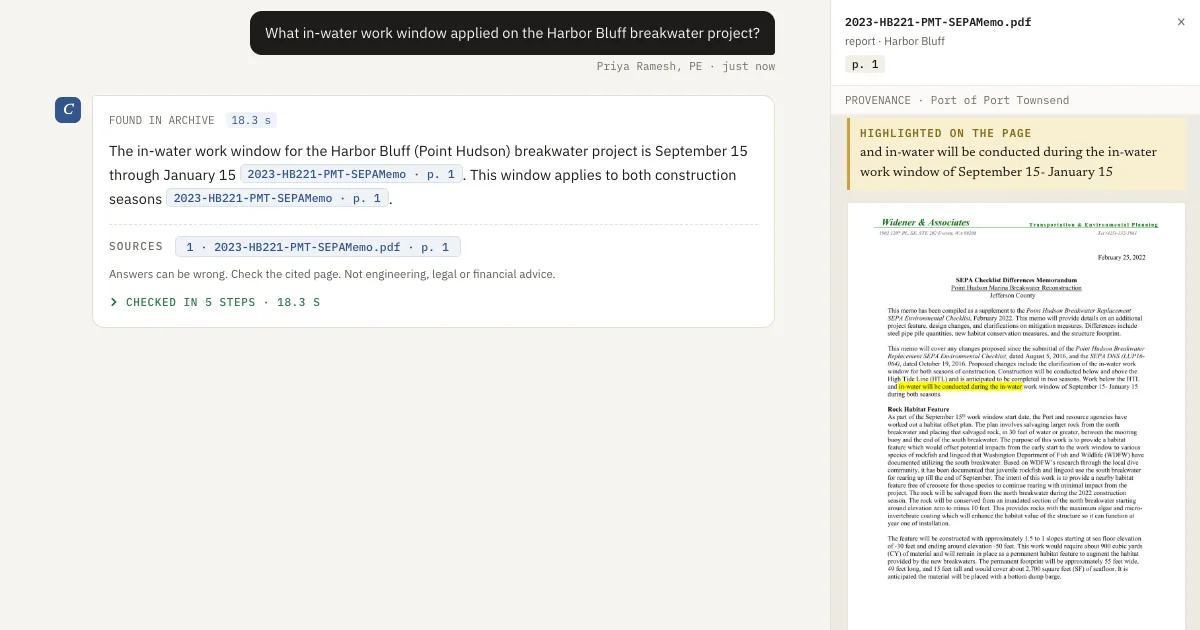
- Read the answer. Each claim is written to carry a citation to a document and page. In this example it cites the project spec, page 7: ACI 350.1, with a leakage limit of 0.05 percent of the test volume.
- Click the citation. The source page opens with the sentence highlighted.
- Ask about something that is not there, such as a liner thickness on a project the firm never did. It is designed to say "Nothing on file".
What a person still does
Open each citation, because the software does not check that every sentence is supported. A qualified engineer decides what the answer means for the work. See how human review works with Corpus.
FAQ
What is page-cited AI search?
Search that answers a question from your own documents and gives the document and page behind each claim, so you can open the page and check it.
Is there AI document search built for civil engineering firms?
Yes. Several AEC vendors offer it. Corpus by SalemWise answers from any company's own documents, with civil, structural, geotechnical, environmental, surveying and mining firms as its first worked example, and you can test it on a public demo archive before you talk to anyone.
What happens when the archive does not have the answer?
Corpus is designed to say "Nothing on file" instead of guessing.
Where does it run?
Set up for you: Corpus is cloud-agnostic. It runs on AWS, Azure, Google Cloud, or your own servers. It can run on a local NVIDIA GPU on your network, with an open-weight model and no public AI API. In the pilot, your files are never used to train or fine-tune a model. In full deployment, fine-tuning on your files happens only if you agree in writing. See data handling.
Next step
Try the demo, then book a free 30-minute call about your own archive. If it fits, the next step is a $5,000 pilot on one real pursuit, about 2 to 3 weeks, credited toward setup if you sign a deployment within 60 days of the pilot's end. Book a free 30-minute call, read how the pilot works, or see Corpus.