How do I search old project folders and scanned drawings?
How do I search old project folders and scanned drawings?
Short answer: Windows and SharePoint search find words in file names and text, but not in image-only scans until the scans are OCR'd. A page-cited AI search such as Corpus by SalemWise reads the archive, answers a plain question and gives the document and page, so you open the sheet and check it. Set up for you: scanned sheets are OCR'd as part of setup.
The problem, as a principal lives it
A client calls about a culvert your firm designed in 2009. They want to know the design flow and who stamped the plans. The project folder is on the old network drive. Inside are forty PDFs named "Scan_0012.pdf" to "Scan_0051.pdf", a few Word files and a CAD folder nobody can open anymore.
Windows search finds nothing useful, because the scans are pictures of pages. There is no text in them to search. Someone opens each PDF and scrolls. An hour later they find the sheet, and the client gets an answer the next day.
The same thing happens every time an RFQ asks for similar work, a claim needs a past detail, or a new engineer wants to see how the firm solved a problem before.
How firms handle it today, and why it is slow
Most firms rely on three things: folder names, the memory of senior staff, and file search in Windows or SharePoint. Folder names help only if people followed the convention. Memory leaves with people. File search reads file names and the text inside a file, so it cannot read an image-only scan, and it returns files, not the page that answers your question.
Even when the text is there, keyword search needs the exact word. Ask for "design flow" when the sheet says "Q100" and you get nothing.
Your options
Make the scans text-searchable
Running OCR over the scans puts text behind each page image, so file search can find words on the sheets. It is a real improvement. It still leaves you with a list of files to open, and drawing text such as notes, callouts and title blocks reads less cleanly than a typed report.
Better folder conventions and a project index
A consistent folder structure and a project list with numbers, clients and years makes the next search faster. It does not help with the folders you already have.
Proposal and DAM tools
Tools such as OpenAsset store curated photos, project descriptions and résumés. OpenAsset says its project module helps you "Keep every project’s photos, files, and documentation securely stored in one place" (OpenAsset, checked October 10, 2026). They are built for marketing content, not for answering a technical question from an old calc package.
General enterprise search: Microsoft 365 Copilot, Glean
Microsoft says Microsoft 365 Copilot grounds answers in organizational data through Microsoft Graph, with "Access scoped by user permissions" (Microsoft Learn, checked October 10, 2026). Glean says it "respects existing permissions, so users only access what they’re allowed to see" (Glean, checked October 10, 2026). Both search across many company apps. How well either reads a scanned plan set depends on whether the scans have text behind them. Our Copilot guide covers this for civil firms.
Corpus by SalemWise
Corpus is page-cited AI search over an engineering firm's project archive. You ask in plain words. It answers from the archive and gives the document and page, so you can open the sheet and check. Set up for you: scanned sheets are OCR'd as part of setup, so they can be searched and cited like the rest of the archive.
How Corpus does it, step by step
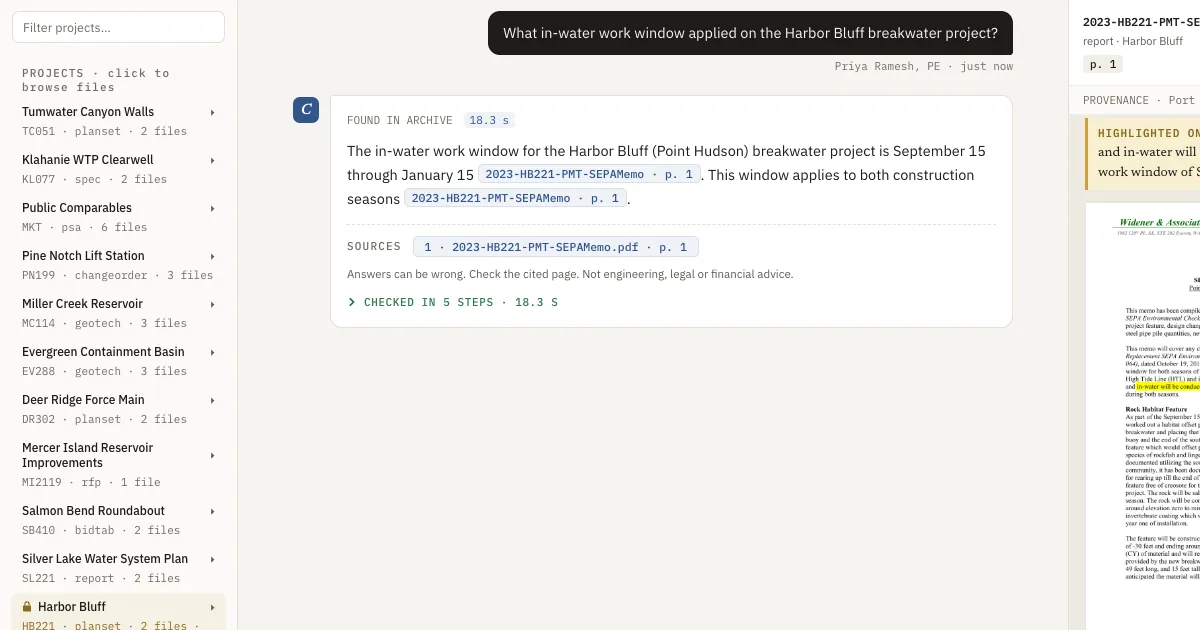
- Browse. In the live demo, the left panel lists the projects of a fictional sample firm, built from real public documents: plan sets, geotech reports, specs, bid tabs and RFQs. Click a project to see its files.
- Ask in plain words. Type a question the way you would ask a colleague, for example "What in-water work window applied on the Harbor Bluff breakwater project?"
- Watch the steps. The answer shows its steps as it works: it checks what you may see, searches by exact words and by meaning, writes the answer, then a second reading checks it. See Ask in plain words.
- Check the page. The answer cites the document and page. Click the citation and the page opens with the sentence highlighted.
- Get a straight no. If the archive does not hold the answer, it is designed to say "Nothing on file" instead of guessing.
- Switch roles. Harbor Bluff is a restricted project in the demo. Switch to the project engineer and it drops out of search. See Roles: who sees what.
What a person still does
A person reads the cited page before relying on it, and a qualified engineer judges whether an old detail applies to new work. For your own archive, tell us which scans matter most; text-searchable PDFs work best in the pilot, and we plan around the scans you care about.
FAQ
Can Windows or SharePoint search read scanned drawings?
Only if the scans have text behind them. An image-only scan has no text to search until it is OCR'd. Even then, file search returns files, not the page that answers your question.
Can Corpus read our scanned drawings?
Set up for you: scanned sheets are OCR'd as part of setup, so they can be searched and cited like the rest of the archive. For the pilot, text-searchable PDFs work best; tell us about the scans you care about and we will plan around them.
Do we have to reorganize our folders first?
No. Corpus works from the files as they are. The pilot uses a copy of up to 3 years of your project PDFs.
What if the answer is not in our archive?
It is designed to say "Nothing on file" instead of guessing, and the answers it does give carry citations you can open and check.
Next step
Start with a free 30-minute call about your archive: where it lives, how much is scanned and which questions cost you the most time. If it fits, the next step is a $5,000 pilot on one real pursuit: about 2 to 3 weeks on a copy of your project PDFs, credited toward setup if you sign a deployment within 60 days of the pilot's end. Book a free 30-minute call, read how the pilot works, or see Corpus.